Mastering Watercolor Halloween Seamless PBR Textures for 3D Art
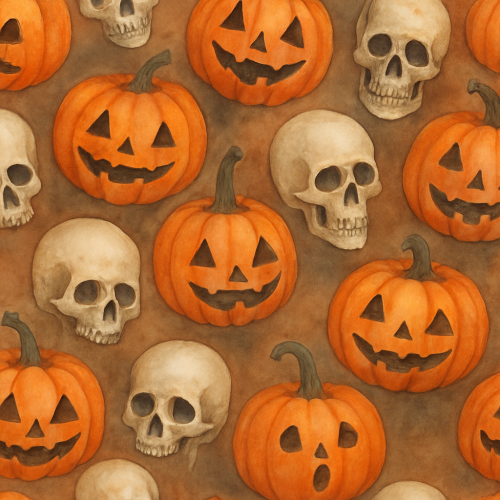
Watercolor Halloween PBR textures represent an intriguing convergence of traditional artistic techniques and contemporary physically based rendering workflows. These textures harness the distinctive aesthetic qualities of watercolor art — its translucency, subtle gradients, and organic edge diffusion — to evoke the evocative atmosphere of Halloween motifs such as pumpkins, skulls, ghosts, and autumnal foliage. From a technical perspective, integrating watercolor visuals into PBR materials requires a nuanced approach to texture authoring, calibration, and optimization to maintain fidelity within real-time engines and offline renderers alike.
At its core, the challenge of watercolor Halloween PBR textures lies in translating the inherently 2D, painterly qualities of watercolor media into the multi-layered, physically interpretable maps demanded by PBR workflows. Unlike photographic or procedural texture sources, watercolor imagery features non-uniform pigment distribution, water bloom effects, and delicate tonal variations that do not straightforwardly convert into typical channel data such as roughness or normal. Successfully capturing these subtleties begins with high-resolution, well-calibrated source imagery—often scanned from original watercolor paintings or digitally painted with watercolor brushes in software like Photoshop or Krita. These sources must retain the nuances of brush strokes, pigment granulation, and paper texture to serve as a compelling albedo/base color input.
The albedo map in watercolor Halloween textures generally emphasizes the chromatic richness and soft translucency characteristic of traditional watercolors. Unlike more saturated or hyper-realistic PBR textures, watercolor albedo maps benefit from preserving subtle color shifts and the natural bleed of pigments, which contribute to the thematic feel of hand-crafted Halloween elements. For example, the warm, muted oranges and browns of a pumpkin’s surface are typically rendered with gentle gradients and uneven edges to mimic the diffusion of pigment in wet paper. Similarly, ghostly figures might be conveyed through delicate, semi-transparent washes fading into the paper texture. Maintaining these qualities requires careful color calibration and avoidance of overly aggressive compression or color space transformations that might flatten gradients or introduce banding.
Complementing the albedo, the roughness map in watercolor Halloween PBR textures requires particular attention to micro-variation. Traditional watercolor paper has a distinct, fibrous surface that subtly modulates specular reflection. This micro-roughness can be simulated by sampling or generating procedural noise that mimics paper grain combined with the natural variation in pigment deposition. In practice, the roughness channel should reflect a generally matte surface with fine-grained inconsistencies rather than sharp specular highlights, aligning with the soft, diffused lighting expected in a watercolor scene. When authoring these maps, blending scanned paper textures with noise patterns or using height-to-roughness conversion algorithms may help achieve a convincing tactile feel.
Normal maps present a unique challenge for watercolor textures, as the original medium is typically flat with only subtle paper embossing or pigment pooling providing depth cues. To enhance realism without detracting from the illustrative quality, normal maps are often generated from high-resolution scans of the paper or through procedural displacement that simulates minor surface irregularities. These normals should be low in amplitude and focused on micro-detail rather than large-scale features, reinforcing the illusion of a textured substrate beneath the painted motifs. Careful calibration is essential to avoid overly intrusive shading that could conflict with the softness of the watercolor aesthetic.
Ambient occlusion (AO) and height maps serve complementary roles. AO maps in watercolor Halloween textures tend to be subtle, emphasizing slight occlusions around creases or pigment overlaps rather than dramatic shadowing. When authoring AO, it is advisable to bake ambient occlusion from 3D geometry where applicable or generate it procedurally with sensitivity to the organic forms common in Halloween motifs. Height maps can be derived from the same sources as normals, capturing faint elevations caused by pigment buildup or paper texture. However, height displacement should be minimal to preserve the flat, illustrative nature of watercolor; excessive displacement risks breaking immersion by introducing unrealistic surface topology.
Metallic maps are generally unused or set to zero in watercolor Halloween textures, as the subjects rarely exhibit metallic properties. Exceptions might occur in thematic accessories—such as metallic lanterns or jewelry—but these require separate texture sets to preserve the watercolor style’s integrity.
From an acquisition and authoring standpoint, a hybrid workflow frequently yields the best results. Starting with high-quality watercolor paintings scanned at 300–600 dpi ensures sufficient detail capture. These images can then be cleaned, color-corrected, and layered in image editing software to isolate elements and prepare the albedo map. Subsequent channels like roughness and normals may be generated through a combination of manual painting, procedural texture synthesis, and photogrammetric data where available. Iterative calibration across channels helps align the perceived material behavior with the watercolor aesthetic under physically based lighting.
Tiling and micro-variation also merit careful consideration. Many Halloween-themed assets—such as carved pumpkin surfaces, patterned fabrics, or repeated ghost motifs—benefit from tileable textures. However, the organic, uneven nature of watercolor patterns can make seamless tiling challenging. Techniques such as edge blending, randomized brush stroke overlays, and micro-variation layering help mitigate obvious repetition artifacts. Additionally, introducing subtle color shifts, noise, and distortion within tile boundaries maintains visual interest and authenticity.
Optimization is another critical factor. Watercolor Halloween PBR textures often rely on high-frequency detail and color variation that can be expensive in memory and bandwidth. Employing texture atlases for smaller motifs, judicious mipmap usage with gamma-correct filtering, and channel packing for roughness and ambient occlusion can conserve resources without compromising quality. Given the diffuse, matte nature of watercolor, prioritizing high-resolution albedo maps while maintaining lower resolution for supporting channels is usually effective.
In terms of engine integration, both Unreal Engine and Blender provide robust pipelines for watercolor PBR textures. Unreal Engine’s material editor facilitates complex layering and blending, enabling artists to combine albedo with paper texture masks, procedural noise for roughness, and tessellation-based displacement for subtle height effects. Calibration tools like the viewport’s real-time lighting and post-processing volumes help preview the soft appearance of watercolor surfaces under various lighting conditions. Similarly, Blender’s node-based shader system allows detailed control over texture inputs and layering, with options to bake custom maps from procedural generators or scanned data. Both engines support PBR calibration workflows that include HDRI lighting setups to assess how watercolor textures respond to directional and ambient illumination, crucial for achieving believable results.
In practice, artists working with watercolor Halloween PBR textures should adopt a workflow that balances artistic fidelity with technical constraints. Starting with well-prepared source imagery, they should develop each PBR channel with an understanding of the watercolor medium’s physical and visual properties. Iterative testing in target engines, with attention to tiling artifacts and lighting response, is essential. Moreover, leveraging procedural methods to introduce micro-variation and subtle surface detail enhances realism without losing the hand-painted charm characteristic of watercolor art.
Ultimately, watercolor Halloween PBR textures offer a compelling avenue for 3D artists and technical directors seeking to blend the evocative beauty of traditional media with the rigor of physically based rendering. When carefully authored and calibrated, these textures can bring seasonal and thematic elements to life with a distinct warmth and artistry that standard photographic or procedural textures struggle to replicate. This synthesis not only enriches visual storytelling for Halloween-themed projects but also expands the expressive toolkit available within modern PBR workflows.
Capturing hand-painted watercolor artwork for PBR workflows, especially within thematic contexts such as Halloween, demands a rigorous approach to preserve the nuanced translucency, subtle color gradients, and inherent texture that define the medium. Watercolor’s hallmark characteristics—its fluid washes, pigment granulation, and paper texture—are crucial to replicate digitally, and the acquisition method plays a pivotal role in ensuring these elements translate effectively into physically based rendering pipelines.
High-resolution scanning remains the cornerstone for digitizing watercolor Halloween textures. A flatbed scanner with a high optical resolution, ideally 2400 dpi or greater, is preferred to capture the delicate brush strokes and pigment dispersion without introducing noise or losing detail. The scanning should be performed in a 48-bit color mode (16 bits per channel) to maximize color depth and dynamic range, preserving the subtle tonal variations in the washes and gradients typical of watercolor. To avoid color shifts, scanner color profiles must be calibrated and regularly verified with a color calibration target such as an IT8 chart. This ensures faithful reproduction of the original artwork’s hue and saturation, which is particularly important for the muted yet vibrant palettes often found in Halloween motifs—deep oranges, purples, and eerie greens.
During scanning, the texture’s paper grain and any physical embossing or brush marks should be captured with clarity; these features contribute to the height and roughness maps in the PBR workflow. If the paper texture is insufficiently detailed or uniform, supplementing the base scan with additional photographic captures under raking light can provide the micro-relief data necessary for normal and height map generation. Using a DSLR camera with a macro lens and controlled lighting angles allows the capture of subtle surface undulations, which can then be processed through photogrammetric software or height map extraction tools. This hybrid approach—combining scanning for color fidelity and photography for surface detail—often yields superior results compared to scanning alone.
Photogrammetry, while less conventional for watercolor, can be employed to capture the three-dimensional paper texture and any accumulated pigment granulation, especially when the artwork is on textured or cold-pressed paper. Multiple photographs taken from various angles under consistent, diffuse lighting conditions allow reconstruction of detailed surface normals and height information. This is particularly useful for generating accurate roughness maps, as the physical paper texture and pigment distribution influence light scattering on the surface. However, care must be taken to avoid specular highlights or shadows that can corrupt the photogrammetry data, as watercolor’s matte finish is prone to uneven reflectance under directional light.
Once digitized, the raw data require careful calibration and post-processing to fit into a PBR texturing pipeline. The albedo or base color map should be extracted with minimal contrast adjustment to maintain the original watercolor wash integrity. Overcorrecting contrast or saturation risks flattening the delicate washes or exaggerating pigment granulation, which detracts from authenticity. The roughness map can be derived from the scanned paper texture and pigment granules, with manual refinement to balance the uniform matte finish of watercolor with subtle surface variations. In many Halloween-themed textures—such as ghostly veils or dripping blood effects—the roughness map plays a critical role in simulating the semi-translucent, diffuse scattering characteristic of watercolor pigments.
Normal maps can be generated via software that converts height information derived from the photographic captures or scan embossing into vector data. This step must preserve the fine undulations and avoid introducing artificial sharpness, as watercolor textures rely on gentle surface variations rather than strong relief. Ambient occlusion maps can be baked or synthesized from the normal and height data to enhance perceived depth, especially around edges of brush strokes or pigment pooling areas.
Height maps, essential for parallax occlusion or tessellation techniques in engines like Unreal Engine, should be carefully balanced to avoid unrealistic surface exaggeration. Since watercolor paper texture is subtle, height values typically remain within a narrow range. The metallic channel is rarely applicable for watercolor textures, given the non-metallic nature of watercolor pigments and paper, but exceptions may exist if the artwork incorporates metallic inks or foils in Halloween motifs.
For tiling, watercolor textures present challenges due to their inherently organic, non-repetitive nature. To facilitate seamless tiling without visible repetition, authors often paint larger source canvases to allow for multiple tileable sections or employ advanced blending techniques in software like Substance Designer or Blender. Micro-variation can be introduced by layering scanned details with procedural noise or hand-painted imperfections, preserving watercolor’s natural randomness while maintaining tiling integrity. When preparing textures for engines, exporting in linear color space and applying appropriate gamma correction in the shader pipeline ensures that the soft edges and color gradients render correctly.
In practical terms, when importing these textures into Unreal Engine or Blender, it is crucial to maintain the original scan’s color profile and bit depth as long as possible, deferring any color space conversions to the engine’s material editor to avoid data loss. Within Unreal Engine’s material system, the roughness and normal maps should be fine-tuned to replicate watercolor’s diffuse reflectance and subtle surface irregularities. Using subsurface scattering or translucency shaders can further simulate the light transmission and layering effects characteristic of watercolor pigments on paper, enhancing the authenticity of Halloween-themed assets, such as spectral figures or misty backgrounds.
Optimization is a final consideration. Given the high resolution of scanned watercolor artworks, texture sizes should be scaled appropriately to balance visual fidelity with performance constraints. Mipmapping strategies must preserve the soft gradients and avoid harsh transitions that could break the illusion of fluid watercolor washes at varying distances. Compression settings should favor formats that maintain color accuracy and minimize artifacts, such as BC7 in Unreal Engine, to prevent banding or posterization in the delicate color transitions.
In summary, acquiring watercolor Halloween textures for PBR workflows is a multi-step process that hinges on high-fidelity scanning, supplemental photogrammetry for surface detail, meticulous calibration, and thoughtful integration into digital pipelines. By preserving the nuances of color, texture, and translucency inherent to watercolor, artists and technical directors can create digital assets that honor the medium’s organic qualities while meeting the rigorous demands of physically based rendering in modern 3D engines.
Creating seamless watercolor Halloween textures that convincingly translate the organic nuances of hand-painted art into physically based rendering (PBR) workflows presents a unique set of challenges and opportunities. The dual approach of integrating photographic captures of watercolor elements with procedural pattern generation techniques allows for a balance of authenticity and technical control. This section delineates the comprehensive methodology for authoring seamless watercolor Halloween textures—encompassing base color (albedo), roughness, normal, ambient occlusion (AO), height, and where relevant, metallic channels—optimized for real-time engines such as Unreal Engine and offline rendering platforms like Blender’s Cycles.
The foundation of a compelling watercolor Halloween pattern begins with high-quality acquisition of the hand-painted source material. Typically, this involves scanning watercolor washes and motif elements—candies, potions, jack-o’-lanterns, bats—in a resolution sufficient to capture the subtle gradients and granulated pigment textures inherent to watercolor. A flatbed scanner at 300–600 dpi is preferred to retain the fluidity of pigment dispersion and paper grain, which critically influence the albedo and roughness channels. When scanning, it is essential to maintain consistent lighting conditions and avoid color casts, as these will propagate errors downstream in PBR calibration.
Post-capture, the raw scans require careful color correction and white balance adjustment to neutralize paper tone and lighting inconsistencies. This step is crucial for generating an accurate albedo map that reflects the true diffuse color without baked-in shadows or lighting artifacts. Separating shadows and lighting from the diffuse color is achieved through layered adjustments and, if necessary, frequency separation techniques in image editing software. The goal is to isolate the pure pigment color, allowing roughness and AO to handle light interaction independently.
To create seamless textures from these hand-painted sources, the traditional approach of edge blending can be enhanced with sophisticated offset and clone stamping methods, but these often introduce unnatural repetition, especially problematic for watercolor’s inherently irregular and organic patterns. Instead, leveraging procedural tiling algorithms—such as those implemented in Substance Designer or Blender’s node system—allows for controlled blending of edges without compromising the watercolor’s characteristic flow. The approach involves extracting key pattern elements and watercolor washes into separate layers, then generating tileable base textures by carefully offsetting and blending edges with mirror and wrap modes, combined with procedural noise masks to break uniformity.
When authoring Halloween motifs for tiling, it is critical to maintain scale and orientation variations to prevent visual monotony. Procedural placement of vector or bitmap motif elements, modulated by noise maps, can emulate hand-painted randomness. For example, candies and potions can be arranged on a grid with randomized rotation and scale within defined parameters, then blended with watercolor wash layers that tile seamlessly beneath. Using masks derived from procedural noise or hand-painted alpha channels allows for nuanced transitions between motifs and background washes, preserving the watercolor’s soft edges and pigment bleed effects.
Beyond the albedo, roughness maps are paramount in simulating the light scattering and microsurface variation characteristic of wet-on-wet and dry-brush watercolor techniques. These maps can be authored by analyzing luminance variance and pigment density from the scanned source or generated procedurally to enhance micro-roughness. For instance, darker pigment concentrations and paper texture areas correspond to higher roughness values, reflecting light diffusely, while lighter, more saturated washes exhibit smoother specular highlights. Careful calibration against physical references is necessary, as overly smooth roughness maps will result in unrealistic glossy patches that betray the watercolor medium.
Normal maps for watercolor textures are typically subtle, given the relatively flat nature of watercolor paper, but they remain important for adding micro-variation and preventing unnaturally flat shading in 3D scenes. These can be derived from the height channel, which encodes pigment pooling and paper grain. Height maps are best generated through a combination of photogrammetric data, if available, or through contrast-based edge detection and emboss filters applied to scanned pigment distributions. Procedural noise can be layered in to simulate paper fiber irregularities. The normal map derived from these height maps should be calibrated to low intensity values to avoid over-exaggeration, preserving the delicate surface undulations typical of watercolor works.
Ambient occlusion maps, while often baked from geometry in 3D workflows, can also be approximated procedurally for 2D watercolor textures. By analyzing pigment concentration and layering, AO maps can simulate localized darkening where pigment pools and water has accumulated, reinforcing the visual depth without geometry. This technique is particularly effective for Halloween motifs like potions, where the liquid’s translucency and container edges influence shading subtly. Combining AO with height and roughness channels enriches the PBR response, especially under dynamic lighting in engines like Unreal.
Metallic maps are rarely applicable in organic watercolor textures unless specific Halloween motifs incorporate metallic accents, such as foil wrappers on candy or metallic potion bottle caps. In these cases, metallic maps are hand-painted or procedurally generated by isolating these elements through alpha masks and assigning full metallic values. These metallic channels must harmonize with roughness and normal maps to replicate accurate reflectance behavior.
Optimization and engine-specific calibration are vital steps before deploying these textures in real-time environments. In Unreal Engine, for example, authoring textures in linear color space with correct gamma adjustment ensures that albedo colors display accurately. Additionally, using Unreal’s virtual texturing or texture streaming features can help manage memory footprint, especially when dealing with high-resolution watercolor patterns. Utilizing mipmaps that maintain color fidelity and prevent blurring of pigment details is critical; this often involves manual adjustment of mipmap bias or sharpening filters during texture import. Blender users should focus on correct color management settings (sRGB for albedo, linear for other maps), and leverage shader nodes that simulate subsurface scattering and translucency to enhance the watercolor’s translucency effect.
Micro-variation is another key consideration to avoid repetitive tiling artifacts. Procedural noise overlays at low opacity, combined with subtle color shifts and slight normal map perturbations, can significantly increase the perceived realism and break pattern uniformity. These variations should be carefully balanced to avoid introducing visual noise that detracts from the soft, flowing nature of watercolor art.
Throughout the workflow, iterative testing under diverse lighting conditions—directional, ambient, and colored light—is crucial to validate the PBR response. Watercolor textures are often sensitive to lighting nuances due to their translucency and pigment layering, so adjustments to roughness and AO maps may be necessary to achieve a natural balance between diffuse and specular reflections. Shader parameters, such as subsurface scattering intensity or translucency weights, can be tweaked in Unreal’s material editor or Blender’s principled BSDF to complement the texture maps.
In summary, the procedural and photographic authoring of seamless watercolor Halloween textures demands a harmonized approach that preserves the medium’s organic irregularity while meeting the technical requisites of PBR workflows. By meticulously capturing and isolating watercolor pigments in the albedo, generating calibrated roughness and normal maps, and employing procedural tiling and micro-variation techniques, artists can create richly detailed, tileable textures that maintain the evocative softness and depth of traditional watercolor art. These textures, when optimized and calibrated for engines like Unreal and Blender, provide a versatile foundation for immersive Halloween-themed 3D environments and assets.
FAQ
What is covered in this guide?
This guide explains Mastering Watercolor Halloween Seamless PBR Textures for 3D Art with practical notes for seamless PBR materials, texture setup, and production use.
Can I use these texture techniques in Blender, Unreal Engine, and Unity?
Yes. The workflow focuses on standard PBR maps and tileable materials that can be used in Blender, Unreal Engine, Unity, archviz, games, and VFX pipelines.
Where can I find textures for this workflow?
Use the AITextured texture library and the related texture links on this page to find seamless PBR materials and preview them before download.
Related Textures
 Procedural Lime Plaster Wall PBR Texture
 Procedural Stamped Sidewalk Concrete PBR Texture
 Procedural Fine Asphalt Road PBR Texture
 Procedural Pitted Concrete PBR Texture
 Seamless Concrete Pebble PBR Texture in 4K Resolution
 Seamless PBR Concrete Rubble Texture with Debris and Fragments
 Seamless Hexagonal Concrete Tile PBR Texture 4K
 Realistic Concrete Paving Brick Pattern Texture