Stucco Wall Finish For Detailed Architectural Visualizations
Seamless texture (tileable) · PNG, WEBP, PBR ZIP.
| ID | seamless-3d-texture-pbr-8k-clay-brick-facade-surface-for-traditional-architectural-designs |
|---|---|
| Category | Architecture |
| Formats | PNG, WEBP, PBR ZIP |
| Size | 1k (1024x1024px), 2k (2048x2048px), 4k (4096x4096px), 8k (8192x8192px) |
| Tileable | Yes |
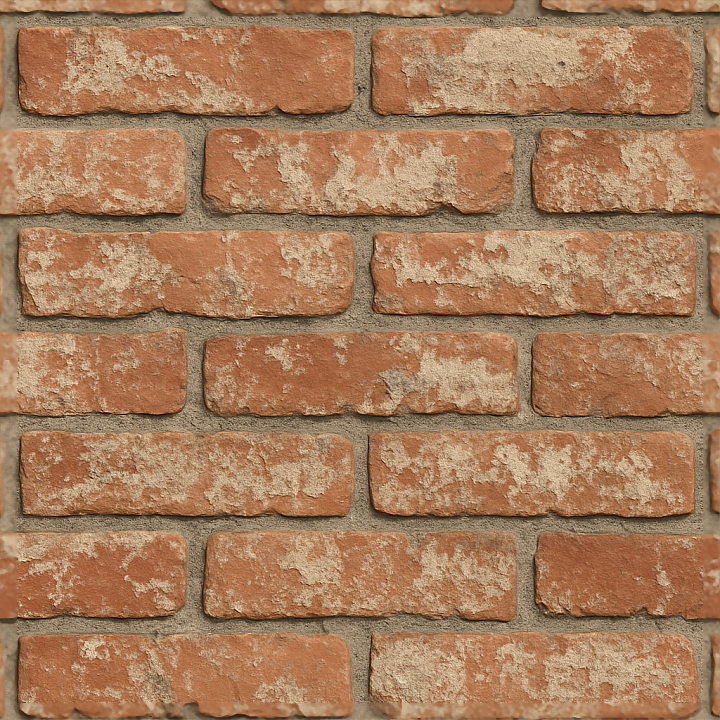
This seamless 3D texture showcases a traditional clay brick facade, meticulously crafted to replicate the intricate geometric pattern of rectangular bricks laid in a running bond arrangement. Each brick exhibits subtle variations in size and surface relief, with clearly defined grout lines and brick mortar joints that contribute to a natural, handcrafted appearance. The base material is classic fired clay, composed primarily of finely ground shale and natural clays, which are shaped and kiln-fired to achieve their characteristic hardness and reddish-brown hues. The bricks’ surface reveals a slightly porous texture, indicative of their mineral composition and firing process, allowing for realistic light interaction and weathering effects.
The mortar filling the joints is modeled as a cementitious binder composed of lime, sand aggregates, and water, which cures into a durable yet slightly rough matrix. This mortar displays fine aggregate grains and minor surface imperfections, enhancing the tactile authenticity of the texture. Over time, the facade has been subtly weathered, exhibiting remnants of faded paint and mineral deposits that suggest prolonged exposure to environmental elements. These weathering details are finely integrated into the surface finish, which is predominantly matte with a low specular reflection, characteristic of unpolished clay bricks and aged mortar surfaces.
From a PBR perspective, the BaseColor (Albedo) map captures the warm red and ochre tones of the fired clay bricks with muted gray-beige mortar hues, including nuanced color shifts caused by weathered paint residues. The Normal map provides detailed surface relief, emphasizing brick edges, porous pits, and mortar joint texture to enhance lighting realism. Roughness values are varied across the texture, with higher roughness on matte brick faces and slightly smoother areas on mortar joints, while the Metallic channel remains consistently low to represent non-metallic ceramic and cement materials. Ambient Occlusion enhances depth perception in recessed mortar lines and brick crevices, and the Height/Displacement map defines the subtle elevation differences between bricks and mortar, allowing for enhanced parallax and tessellation effects.
The texture is rendered at an ultra-high 8K resolution, ensuring exceptional detail for close-up architectural visualization and high-fidelity modeling in Blender, Unreal Engine, and Unity environments. Its seamless nature allows for large-scale facade coverage without visible tiling or pattern repetition, making it suitable for both exterior wall surfaces and detailed environment assets. For optimal use, adjusting the UV scale to match real-world brick dimensions will maintain proportionate detail, while fine-tuning roughness can simulate varying degrees of weathering or surface contamination. Additionally, blending height and normal maps can enhance depth perception without excessive geometry displacement, preserving performance efficiency.
Import the texture maps into Blender with sRGB color space for albedo/base color and Non-Color for normal, roughness, metallic, AO, height, and ORM maps. Connect normal maps through a Normal Map node, then adjust UV scale with a Mapping node so the material repeats naturally on your model.
For the full step-by-step setup, see How to Use Seamless Textures in Blender. Browse related material examples in wood, concrete, and metal.
Yes. This texture is designed as a seamless tileable PBR material, so it can repeat across large surfaces without visible borders.
Use the download controls on this page: they expose the available PNG, WEBP or engine ZIP choices and supported resolutions for this asset.
Use the engine ZIP choices to package compatible source maps for Blender, Unreal Engine or Unity, then verify the imported material in the target application.
Commercial-use permission is not verified for this record. Confirm the original source and license before production use.
Generate maps from existing images, preview materials, convert channels, and package compatible inputs for Blender, Unity, and Unreal Engine.
Choose a verified workflow for generating maps, previewing tiling, converting channels, or starting from the texture catalog.
Derive Normal, Roughness, AO, Metallic, Height and optional ORM maps from one or more source images, then review the results.
Instant WebGL viewer: inspect materials on a sphere, plane, and cube. Check tiling and lighting in real time.
Re-packages maps per engine: Unreal (BaseColor + ORM), Unity (Mask/MetallicSmoothness), Blender (separate channels).
PNG ↔ JPG ↔ SVG: fast convert, SVG rasterize, embed/trace options, quality & background controls.