
Blue and White Porcelain Texture | Free PBR
Seamless texture (tileable) · PNG, WEBP, PBR ZIP.
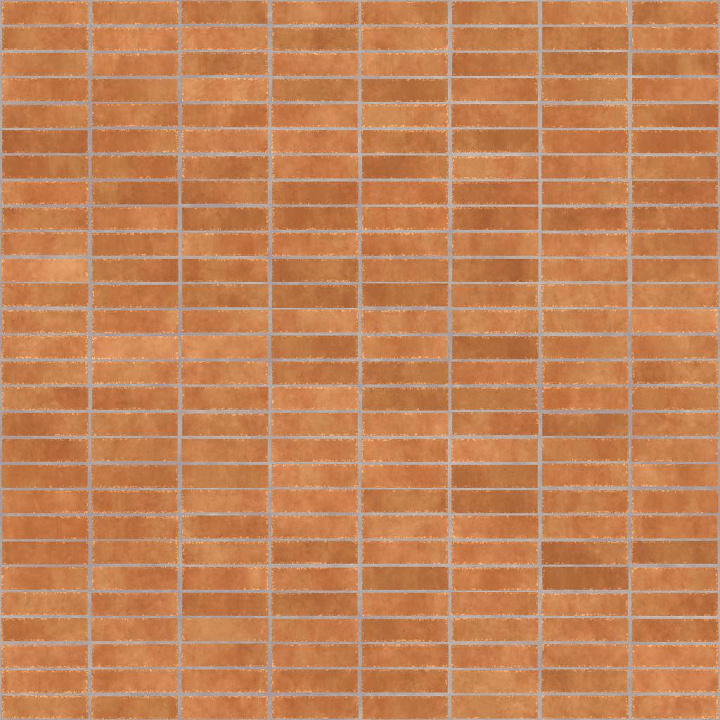
| ID | horizontally-stacked-terracotta-tiles-free-pbr |
|---|---|
| Category | Tile |
| Formats | PNG, WEBP, PBR ZIP |
| Size | 1k (1024x1024px), 2k (2048x2048px), 4k (4096x4096px), 8k (8192x8192px) |
| Tileable | Yes |
This texture features horizontally stacked terracotta tiles crafted from a ceramic base substrate rich in natural clay minerals. The tiles exhibit a characteristic porous structure typical of terracotta, with subtle variations in grain orientation and surface roughness resulting from traditional firing processes. Earth-toned pigments and iron oxide layers give the tiles their warm reddish-brown hues, while slight weathering and surface imperfections add authenticity and visual interest. The surface finish reflects a matte, unglazed terracotta appearance, with natural micro-roughness that diffuses light softly without any metallic sheen.
In the PBR workflow, this high-quality seamless texture delivers detailed BaseColor/Albedo maps capturing the nuanced terracotta coloration and weathered spots. The Normal map enhances the perception of tile edges, grout lines, and subtle surface irregularities. Roughness maps convey the varied matte finish with slightly higher roughness values in worn areas, while the Metallic channel remains at zero to reflect the ceramic, non-metallic nature of the material. Ambient Occlusion highlights crevices between tiles, adding depth, and the Height/Displacement map captures fine surface relief and tile thickness for realistic parallax effects.
Rendered at up to 8K resolution, this texture is fully optimized and compatible with Blender, Unreal Engine, and Unity, making it suitable for architectural visualization, game environments, and virtual reality projects. For best results, adjusting the UV scale to match real-world tile dimensions ensures natural repetition, while fine-tuning roughness can simulate varying weathering levels. Using the Height map with parallax occlusion or displacement will enhance realism by emphasizing tile depth and surface detail without heavy geometry.
Import the texture maps into Blender with sRGB color space for albedo/base color and Non-Color for normal, roughness, metallic, AO, height, and ORM maps. Connect normal maps through a Normal Map node, then adjust UV scale with a Mapping node so the material repeats naturally on your model.
For the full step-by-step setup, see How to Use Seamless Textures in Blender. Browse related material examples in wood, concrete, and metal.
Yes. This texture is designed as a seamless tileable PBR material, so it can repeat across large surfaces without visible borders.
Use the download controls on this page: they expose the available PNG, WEBP or engine ZIP choices and supported resolutions for this asset.
Use the engine ZIP choices to package compatible source maps for Blender, Unreal Engine or Unity, then verify the imported material in the target application.
Commercial-use permission is not verified for this record. Confirm the original source and license before production use.





Generate maps from existing images, preview materials, convert channels, and package compatible inputs for Blender, Unity, and Unreal Engine.
Choose a verified workflow for generating maps, previewing tiling, converting channels, or starting from the texture catalog.
Derive Normal, Roughness, AO, Metallic, Height and optional ORM maps from one or more source images, then review the results.
Instant WebGL viewer: inspect materials on a sphere, plane, and cube. Check tiling and lighting in real time.
Re-packages maps per engine: Unreal (BaseColor + ORM), Unity (Mask/MetallicSmoothness), Blender (separate channels).
PNG ↔ JPG ↔ SVG: fast convert, SVG rasterize, embed/trace options, quality & background controls.